
In a larger users@ thread about multiple BSD development systems and how to set them up, I spied this tip on making multiple local virtual machines all reachable via SSH.
Shamelessly copied from my own users@ post: I tagged 5.6.1 and built it earlier today. This version has a corrected sshd_config and fixes a lockup bug in ttm. The ISO should be showing up on mirror-master.dragonflybsd.org in the next 20 minutes or so, or you can rebuild using the normal process on an existing 5.6 system:
cd /usr/src
git pull
make buildworld
make buildkernel
make installkernel
make installworld
make upgrade
If you are still on 5.4 or earlier, you need to bring in 5.6 sources, which is noted in the 5.6.0 announcement.
OPIE was disabled recently in DragonFly. Now that the 5.6 release is out, it has been removed. This may require manual intervention if you are on DragonFly-master (i.e. 5.5. or 5.7) and update in the next day or two. This need to fiddle with it will go away soon with changes to ‘make upgrade’; I will mention it when I see it.
This won’t affect anyone running 5.4 or 5.6. It’s only in development.
DragonFly 5.6.0 has been released. This version brings an improved virtual memory system, updates to radeon and ttm, and performance improvements for HAMMER2. Matthew Dillon did some informal testing of the VM improvements, and posted results to the users@ list.
My users@ post has the usual details on upgrading (pay no attention to my 5.4 typo), as do the release notes.
ISO and IMG files of DragonFly 5.6rc1 should start showing up at mirrors over the next few hours. This is the release candidate, not the release, so don’t install unless you want to test.
Thanks to a suggestion from Lassi Kortela, man.dragonflybsd.org now exists and takes you directly to the online man page interface, similar to man.(free/net/open)bsd.org.
A question on starting up a virtual kernel on DragonFly and sticking it in the background led to some suggestions – follow the thread.
NYCBUG is meeting at Suspenders, tomorrow. The announcement has details. Go, if you are near.
That sounds like a good thing, right? No automatic bugs, just manually placed ones. What it really means is that bugs.dragonflybsd.org no longer autocreates users, cause there was a certain amount of spam coming through freely created accounts there. It may be hard to tell the next step.
Here’s something that might be useful: an example cleaning file for creating an AWS DragonFly image. Here’s the blob if you want to see what’s in it. I assume you will want to install awscli to use.
It’s on the RSS feed but not in the normal place, and it’s early, so I bet this week’s BSD Now is put together early because of travel. I’m linking to it early for similar reasons.
If, like me, you’ve been running DragonFly for a long time, and you haven’t switched away from tcsh for your account or for root, you may not have ‘set autorehash’ in your .cshrc. Newer installs have it.
Put that into .cshrc if you don’t have it, and it’ll save 15 seconds of the rest of your life not typing ‘rehash’… assuming you can overcome the muscle reflex.
Remember my Wyse terminal experiment with a DragonFly VM? I mentioned an odd output pause where the screen would stop updating until there was keyboard activity – or occasionally just die. That was an artifact of Virtualbox; running this now in Qemu has no such problem.
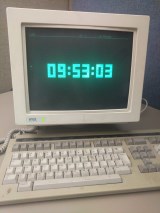
I now have a very overcomplicated clock! I’m running GRDC on this Wyse-185 connected as a vt100 to the virtual machine running DragonFly 5.4 in Qemu on my Windows 10 work laptop. It’s at 9600 baud so I can see the numbers morph. I find this aesthetically satisfying.
The May NYCBUG meeting is tomorrow night, at 6:30 PM at Suspenders. The presentation is “Lookup Data Structures in the FreeBSD Kernel“. Go, if you are near.
Tonight’s KnoxBUG meeting is canceled at the last minute due to a family emergency. Don’t go, if you are near.
DragonFly 5.4.2 is out. My users@ post describes upgrading, as do the 5.4 release notes. This release has the HAMMER2 fix mentioned here recently. There’s a number of additional small changes listed in the tag commit.
Images are available for download at various mirrors, too. If you’ve recently upgraded to 5.4, it’s the normal build process.
I managed to find an ancient Wyse-185 terminal at my workplace today, left in the corner of the server room. For entertainment purposes only, I booted DragonFly in VirtualBox and attached the physical terminal to the physical serial port on my Windows laptop docking station, mapped through to that virtual machine.
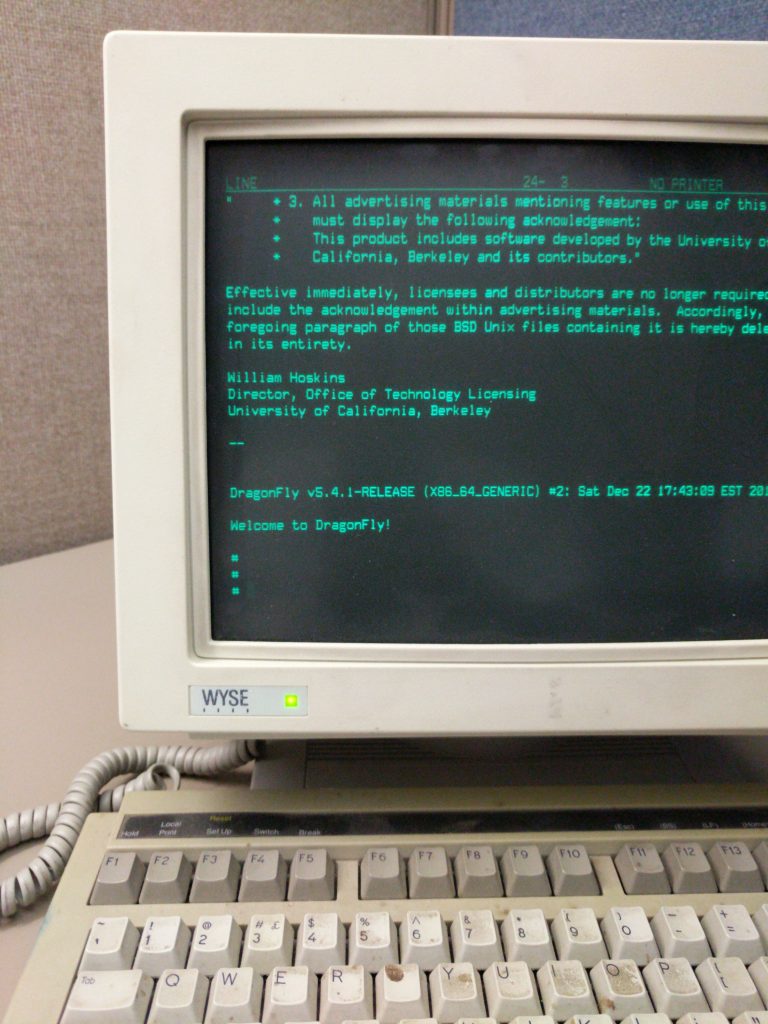
I have already discovered that the character output will often pause until the keyboard is used, which may be a settings issue. Mash the keyboard enough and VirtualBox dies. I’d use different emulation but Hyper-V doesn’t support serial and Qemu I haven’t figured out.
It’s entertaining, though I am not sure what I will do, other than maybe run GRDC once I figure out the reason for output pausing.
“Verification As Code of Infrastructure As Code” is being presented tonight at 6:45 PM at NYCBUG by Raul Cuza. Go, if you are near.