
Syscons now holds 10 screens back, not 4. Every few years, I really, really need that.
For your ease of use: a Vagrant box with shared folders enabled. (via)
I just wasted an hour trying to figure out why xorg had strange output but no errors on this laptop, and it’s because I had i915_load=”YES” in /boot/loader.conf instead of i915_load=”YES” in /etc/rc.conf. I’m almost nearly sure I’ve mentioned that before, but if not: here you go.
(though if you never plan to run X, you can put it in loader.conf and everything will just work.)
(Title updated for a more correct sentence)
Noted from this commit: if you are routing over IPv6 directly to another address, the sysctl net.inet6.icmp6.nd6_onlink_ns_rfc4861 must be set to 1.
A writeup that may help someone in the future: if you decide you want to encrypt your /home directory, on DragonFly, this is how you do it.
If for some reason smartmontools seems to think your disks aren’t SMART-capable, force smartd to use SCSI ioctls. has a snippet to use in your smartd.conf for just that.
If you are starting KDE on DragonFly, you’ll want to be sure dbus is started too. Mentioning it juuuuuust in case…
I installed a DragonFly snapshot on a Lenovo x220 last night. I went for a EFI install, even though the x220 has a “Legacy” option. When I booted, it looked like this:
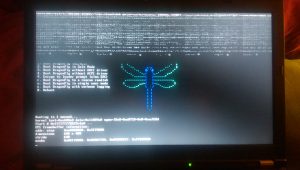
It successfully booted, but once it hit the kernel load, it started printing to the top of the screen in that lovely repeating pattern you see.
Matthew Dillon helpfully pointed out that the DRM and i915 modules needed to be loaded. Hitting ‘9’ during the bootloader countdown got me to a prompt where I could type:
drm_load="YES"

i915_load="YES"'

kern.kms_console=1

menu
Which brought me back to the boot menu, but this time it loaded those additional modules to support the Intel video chipset – and it worked!
These lines can go in /boot/loader.conf for permanent use.
Update: accelerated X will need a different setup – see my later post.
Matthew Dillon’s been using a Kabylake NUC for a DragonFly workstation and it’s generally working out well. It’s tiny enough to lose on a desk, in my opinion. He added performance details and a screenshot. The Specific Configs page has his notes, recorded, too.
Related laptop tip: If you have a Lenovo Yoga and can’t mount the drive after install, various sdhci modules may be the answer. Update: definitely the answer.
Here’s a detailed writeup from Aaron LI on how to get a DragonFly system onto an IPv6 network.
Update: He also supplied an example pf ruleset that solved some IPv6 throughput problems for his VPS.
There’s a new facility in DragonFly: kcollect(8). It holds automatically-collected kernel data for about the last day, and can output to gnuplot. Note the automatic collection part; your system will always be able to tell you about weirdness – assuming that weirdness extends to one of the features kcollect tracks. Here’s some of the commits.
sshlockout(8) will now lock out based on number of attempts, just so that you don’t have huge logs of stubborn but stupid SSH brute force attacks.
I’ve got some esoteric stuff this week.
- 24-core CPU and I can’t move my mouse. The description of Amdahl’s Law is something not enough people realize. (via)
- Pushing DNS into the Cloud.
- Relive WW2 Lorenz decryption. (via)
- books chapter four and books chapter five.
- Build-from-a-kit mechanical keyboard, and odd but pretty controller. (via)
- Nyan routing. (via)
- Well Played vol 6,2 – european videogames of the 1980s. Free download of the issue. (via)
- Everything You Always Wanted to Know About IPv6. Video from ARIN, so pretty authoritative. (via)
- URLS are UIs. (via)
- White Spots. The idea of using VR to visualize transmitter location is interesting. (via)
- That’s a Big Microscope…
- UNIX: How random is random? Depends on current operating system, which this article glosses over.
- Visual Subnets. Click “How’s this work?” on the side if it’s not clear.
- Introductory bullshit detection for non-technical managers. This is excellent for project planning overall, not just the BS part. (via)
Unrelated audio link of the week: Alan Lomax recordings are up on Bandcamp.
Bryan C. Everly eventually figured out how to configure his ThinkPad x230 so that the TrackPoint worked in xorg, and he wrote it down.
Should you need have Ubiquiti devices, and you need to get the Unifi management program running on your DragonFly server, this script will work for you. Some of the filepaths are different, but it’s otherwise complete.
Matthew Dillon noted some OpenVPN problems, requiring him to disable compression. I don’t think this is a DragonFly problem, or even necessarily a BSD problem, but it’s worth mentioning in case you run it.
A lot of this was picked up during the previous long U.S. holiday weekend.
- A Brief History of the ATM and As cash becomes quaint, are ATMs on path to obsolescence? (via)
- The evolution of the laptop computer. Clickbaity and not comprehensive, but fun to look at the pictures. (also via)
- A tip for catching process state changes.
- The Pacification of the Nerd.
- The forgotten joys of the screen saver. (via, of course)
- Erdos-Bacon-Sabbath Numbers. (via)
- Decalogue, by Jan Svankmajer. Svankmajer’s movie “Lunacy” is the most disturbing? distressing? film I’ve ever watched. (via)
- Speaking of which, Svankmajer was an influence on the Quay Brothers, whom I was talking about with someone else recently. Surely you’ve seen Street of Crocodiles?
- userland xnr jit.
- open-adventure, the original, ported. (via)
- Writing a Unix Shell. (via)
- Compiler Optimizations are Awesome.
- Tron B-Roll. Most evocative to those who remember computer graphics pre-texture-mapping.
Andrew MacIntyre manually installed DragonFly onto a UEFI system, and conveniently he posted his notes. It includes a GRUB menu entry, which will come in handy for someone
If your DragonFly system’s Intel network device doesn’t seem to pick up on DHCP, try turning on polling. This may already be a nonissue, but it doesn’t hurt to mention it.
Update: fixed.
A tip that might be useful for some readers: Mohammad BadieZadegan posted that he had a poor network connection, and so was having a hard time installing packages. If that bites you too, there are some pkg.conf options – starting with FETCH_TIMEOUT and FETCH_RETRY – that may help.